
In order to facilitate the installation of Bionic Cat software on a new or newly-erased PC, follow the steps below.
Some notes before diving in:
- Acquire a USB stick of virtually any size. (only 40MB is needed)
- Make sure the PC is off before you start the process. Only turn on when specified below.
Here are the steps:
- On a different computer than the one you plan to configure, download this file: https://bionic.cat/WinAutoConfig
- Pro-tip: do not double-click or otherwise try to run this file on the computer you're using to download the file!
- Copy the downloaded file ("Auto-No Removal of bundled software.ppkg") onto your USB drive. It must be at the root of the USB drive, that is, not within any subfolders.
- Insert the USB drive into the new computer or newly-erased computer
- Preferred, but not required: plug your PC into your router or switch using an ethernet cable
- Turn on the computer and let the computer configure itself
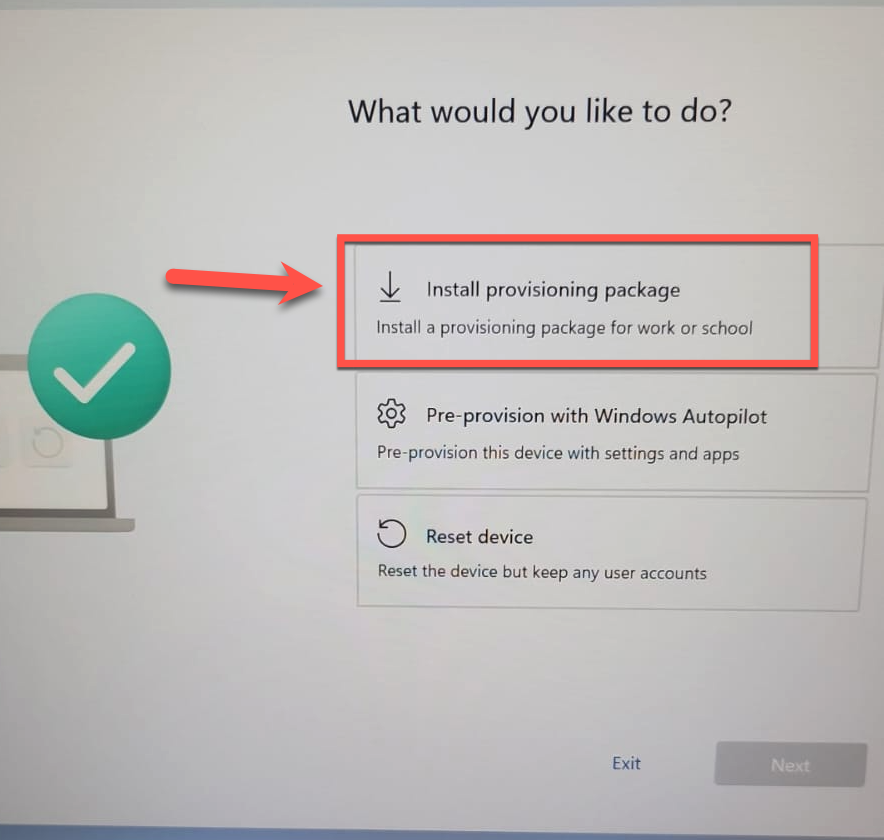
- Note: if you encounter a screen asking "What would you like to do?", select "Install provisioning package" and then select the file you've downloaded on your USB Drive.
- When you see a blue screen with the time and the user "BCTemp" come up, please let Bionic Cat (support@bioniccat.com) know for final steps
Below is a quick video showing you the process after you've booted up a new or erased PC with the USB stick installed.